
How I used AI to turn the Nailor EZvav IOM into a nine-lab training simulator, and what three rounds of checking caught that reading alone never would.
I build training simulators the same way every time. I write the requirements. An AI agent writes the code. Reviewers check the result. EZV-01, my simulator for Nailor EZvav digital VAV controls, followed that path. It also showed me where the real work sits.
Start with what to cut
The source is IOM-EZVAVINST, Nailor’s 48-page installation and operation manual. Before writing a single requirement, I listed what the manual repeats. Connection details show up in several sections. Maintenance appears twice. Safety notes repeat. Sensor operation overlaps with installation. A simulator that copied that structure would teach the same thing four times.
Claude found a bigger repeat. Seven procedure tables restart with the same opener: press up and down together, enter Password 2. The simulator teaches that once.
Two prompts, then one
The first build prompt Claude drafted was short and specific. It named the keypad menus, the sequence numbers, and a list of errors in the manual. A second, longer master development prompt had a stronger frame. It set the governing rule that a command is not proof of operation. It required one shared simulation engine and testable acceptance criteria.
When I asked Claude to assess the longer prompt against the manual, the gaps were plain. It asked for nine labs, three lesson modes, and four difficulty levels in one HTML file. It said “according to the documented sequence” where the manual gives exact numbers. It never listed the errors in the manual, so a build agent would have copied them.
So we merged the two. The v2 prompt runs 29 pages. It sets a build order, so the keypad and sequence lab come before the extras. It states every value with a page number. It carries the full BACnet object list and the K-factor tables as appendices, so the build agent does not have to read them off scanned pages. It also sets on-screen writing rules, because the text on screen tends to copy the voice of the prompt.
Eighteen notes against the source
Reading the manual this closely turned up 18 places where it is wrong or contradicts itself. Three examples:
- Page 36 converts a 4°F differential to -15.56°C. The right answer is 2.2°C.
- Page 18 sends you to page 43 for K-factors. They are on page 47.
- The floating reheat drawing shows one two-wire thermal actuator on BO6. The text says two outputs drive a tri-state actuator.
The simulator shows each one as an amber Manual note. It does not fix them quietly. I’ll come back to why in a separate column.
The build
The first build was one HTML file, about 276 KB, with no libraries, storage, or tracking. With the Register added, it is about 317 KB. Nine labs share one engine. A setting changed at the keypad shows up in the sequence lab, the wiring bench, and the BACnet object list.
The keypad face draws its own 14-segment display and follows the p.28 menu tree. The wiring bench lets you land wires terminal by terminal and see the effect in the engine. There are fifteen field calls and a commissioning capstone that grades your work against the live box.
What testing caught
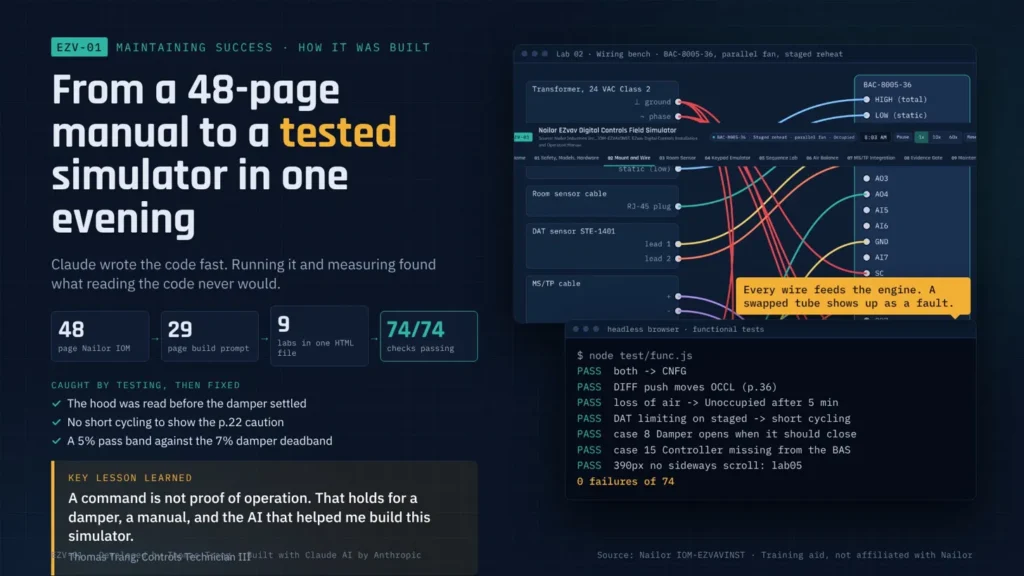
This is the part I want other builders to hear. Claude wrote 74 automated checks and ran them in a headless browser. They covered the disclaimer gate, the keypad paths, the sequences, all fifteen field calls, and the phone layout. The first runs failed in useful ways.
- The automated balance took its flow hood reading before the damper reached its target. The correction math worked, but it was fed readings taken while the damper was still moving.
- Staged reheat with DAT limiting did not short cycle, so the manual’s caution had nothing to show. We tightened the DAT loop, and the simulator labels that tuning as a training model.
- The prompt asked for verification within 5% of set point. The manual’s damper deadband lets the controller hold anywhere inside 7% (p.38). A 5% check failed boxes that were working, so the damper calls now use 7%. The capstone cooling check still uses 5%, and that decision is open.
- The correct answer was always listed first in the quiz and the field calls. The order is shuffled now.
- At phone width, several screens pushed sideways.
None of these showed up from reading the code. They showed up because something ran and measured.
Labels instead of guesses
The manual does not cover everything a simulator needs. It gives no PID tuning, no room thermal model, and no balancing math. Those parts exist in EZV-01, and each one carries a Training model tag. Manufacturer values carry their IOM page. Settings you enter are tagged as field settings. General safety practice is tagged as field practice, because it does not come from the IOM.
One row per parameter
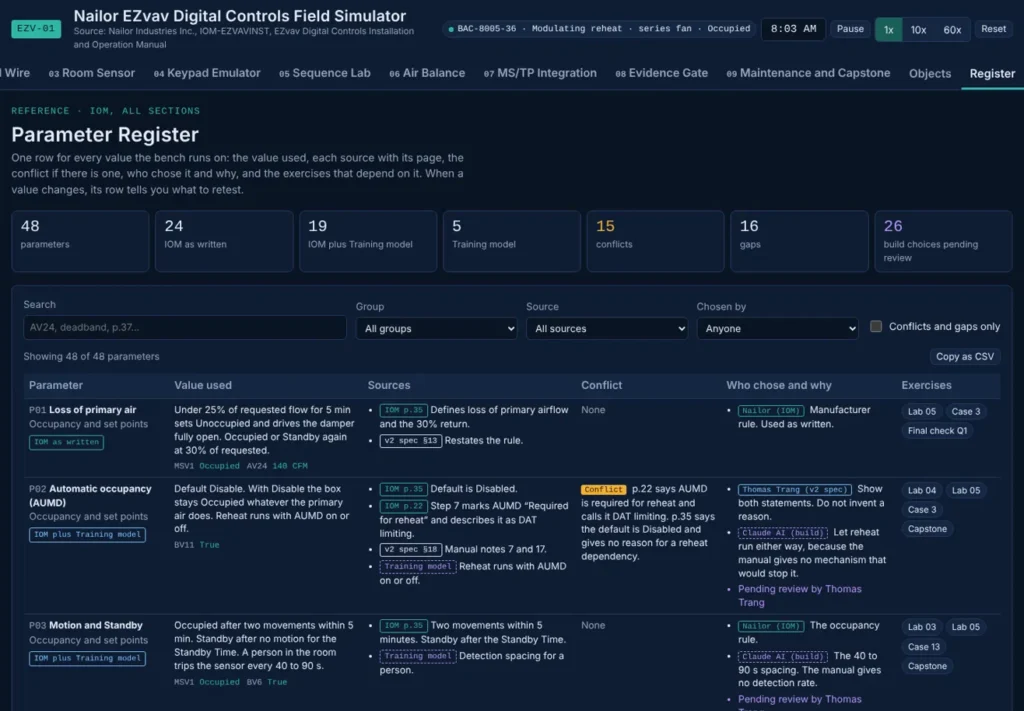
After I posted about From Manual to Model: Building the EZvav Simulator, Nikolai Babakov suggested in the comments a register kept next to the model. One row per parameter: the value used, each source with its page, the conflict if there is one, who chose it and why, and which exercises depend on it.
EZV-01 now has that as a Register tab. It holds 48 parameters. 15 rows show sources that disagree, and 16 show a gap the manual leaves open. 26 rows record a choice Claude made during the build, and each one is marked pending my review.
The “who chose and why” column was the hard one to fill. Claude had added a 120-second changeover delay on AV55. My own spec said not to build behavior for that object, and nobody had recorded a reason. The row now says exactly that, and the delay waits on my decision.
The exercises column proved itself the same day. The modeled airflow sensor reads more than 4.5% low above about 0.55 in. w.c., outside the span accuracy on p.5. Claude tried a curve that stays inside spec. Case 5, a bad balance on a cool-only box, stopped showing a symptom: AV24 landed 0.5% from the hood instead of about 12% off. The row already listed Case 5 as a dependent. The original curve went back, and the trade-off is written down for me to settle.
A review is not a test
Then a written review came back calling the simulator highly accurate against the IOM. I read it closely. It restated the Register. It reported no test runs and no measured values, and it found nothing the Register had not already flagged. It even listed a few items as exact matches that the Register marks as conflicts.
So the next step was to test the published rules themselves. A script drove 31 rules from the IOM through the running simulator, from the p.6 motor timing to the p.47 K-factor tables. The first pass failed three. Two of those were mistakes in the test script. The third was real.
AI4, the sensor’s pressure reading, showed the true pressure at the ports. AV23, the raw flow, carried the modeled sensor error. A tech working Q = K × √ΔP from AI4 would miss AV23 by 2.4% at 0.59 in. w.c. and by 14% at 1.96 in. w.c. AI4 could also read past the sensor’s 0 to 2 in. w.c. range. The IOM calculates airflow from the measured pressure and the K-factor (p.34, p.47), so those two numbers should always agree. In EZV-01 they now do.
Rerunning every test after that fix turned up one more. When the capstone injected Case 1, nothing cooled the room, so the symptom never appeared and the fix could not be verified. The capstone picks that fault one time in four. It took a one-line fix.
As of October 24, EZV-01 passes all 32 published-rule checks, including a new one for the AI4 range. It also passes 91 functional checks and scores 100 on the capstone with each of its four faults.
What I take from it
Most of the first evening went into the prompt. Deciding what the simulator should teach, and which numbers it must get right, took more of my time than the code did.
Each round of checking caught something the one before it missed. Reading the code missed the balance timing, and the first tests caught it. Nobody could explain the AV55 delay until the Register asked who chose it. The AI4 mismatch looked fine on every screen until a script measured it. A review that restates your own documentation finds none of that, because nothing runs.
Nailor has not reviewed EZV-01. A few Register rows need an answer only the factory can give, such as what AV55 does and how the balance correction is calculated. Until then, those values stay labeled as training models, and the open decisions stay marked as mine.
Try it: EZV-01 EZvav Field Simulator
EZV-01 is an independent training aid, not affiliated with or endorsed by Nailor Industries Inc. It does not replace the current Nailor IOM, and a simulated result is not proof a real box works.
Source: Nailor Industries Inc., IOM-EZVAVINST. Developed by Thomas Trang. Built with Claude AI by Anthropic.